

This article explains why you may receive a password reset email for AWARD® that you did not request, and what it means for your account.
Overview
If you receive a password reset email but did not initiate a reset, it does not necessarily indicate an issue with your account. There are a couple of common and valid reasons why this may occur.
Possible Causes
1. Reset performed by an AWARD® account administrator
An administrator may have reset your password on your behalf. This can happen as part of account maintenance, user management, or support activity.
2. Added to a different AWARD® account
You may have been granted access to a new or additional AWARD® account. In this scenario, a password reset email is often triggered to allow you to access that account.
What to Check
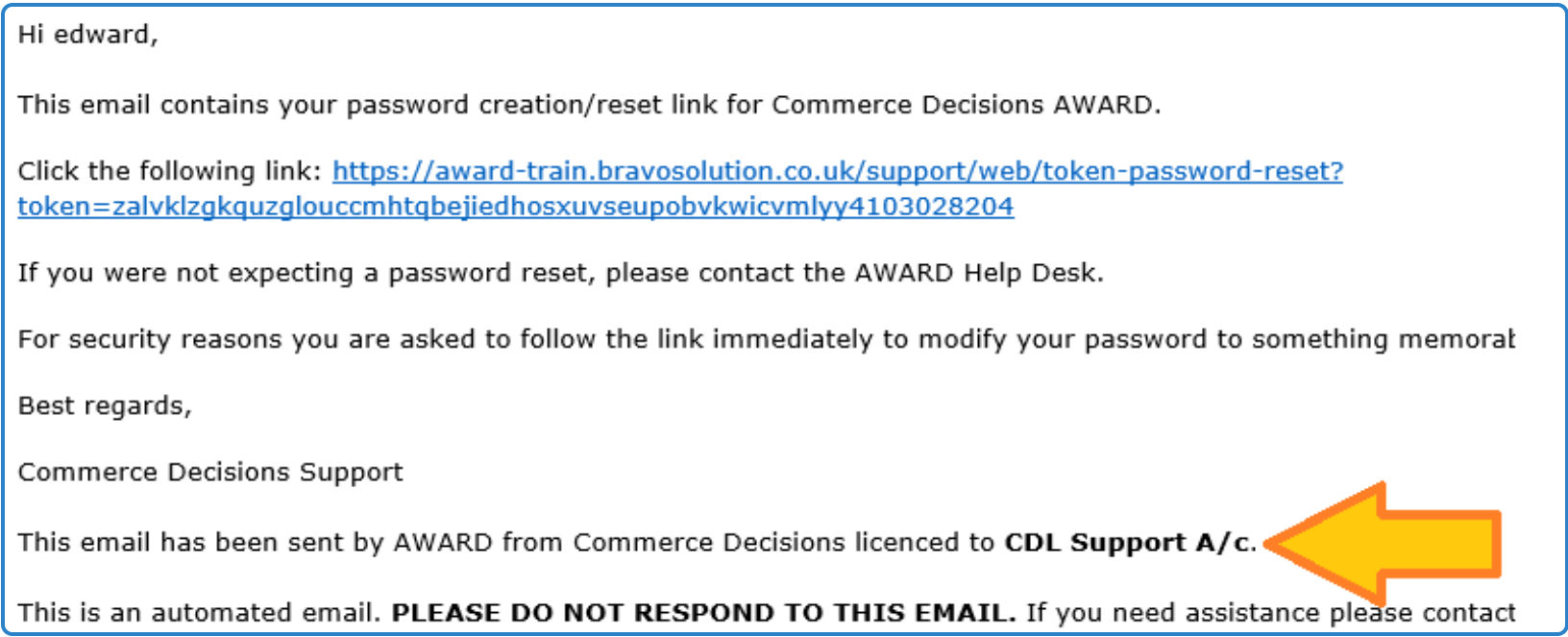
- Review the email content carefully: The email will include details of the specific AWARD® account associated with the reset. This can help you identify why it was sent.
- Confirm with your AWARD administrator or colleague: If you are unsure why the email was received, it is recommended to check with your internal AWARD® administrator or the colleague who may have arranged access.
example email:
What to Do Next
- If the reset was expected (e.g. new account access), follow the instructions in the email to set your password.
- If you were not expecting any changes and cannot confirm the source, avoid using the link until you have verified the reason with your team or support.
Summary
Receiving a password reset email without requesting one is usually the result of admin action or new account access. The email itself will include the necessary details to help identify the reason.